
Today’s Post by Joe Farace
I do have high standards, but I don’t expect anything from anyone that I don’t expect from myself.—Olivia Newton-John
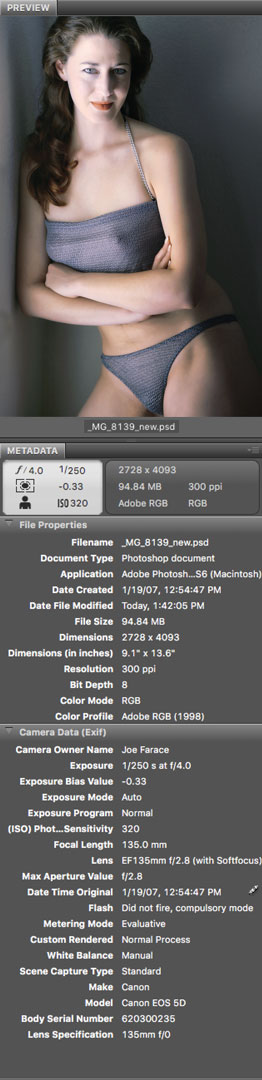 In 1995, the Japan Electronic Industries Development Association established The Exchangeable Image File (EXIF) standard to accommodate different kinds of digital image file formats, allowing photographs made with one kind of camera to be viewed on another, different camera or device. EXIF is part of the Design Rule for Camera File Systems (DCF) that ensures compatibility between digital cameras and printers and allows image files to be exchanged so photographs made with a Canon EOS 5D, as the featured images was, to be viewed on a Panasonic Lumix GH4’s LCD screen, for example.
The EXIF Standard
The EXIF standard does many different things: It also defines file naming standards and folder structures, including how to store image and camera data.
When a camera is set to capture and record a JPEG image file, it’s also recording EXIF file data using compression to store that additional photo data within the file. Within the image file’s header, EXIF metadata—a set of data that describes and provides information about other data— supports storage of other camera information. This includes the time and date an image was made, device name, shutter speed, aperture, along with other capture-related data including compression, color space and number of pixels. You can read all this header information externally using EXIF-compatible software, like the section of Adobe Bridge shown at right, that in turn uses it for image file management.
In addition to image data, EXIF includes thumbnails. Under DCF standards a typical thumbnail measures 160 x 120 pixels and image editing programs such as Photoshop use EXIF data when displaying thumbnails in Bridge and, I guess Lightroom, although I don’t personally use that program anymore. Clicking a thumbnail in Bridge allows you to see all the EXIF data so you can read specific details of how an image was captured, unlike when using film when you had to make physical notes or have a really good memory.
 One of the differences between the current version of EXIF and previous ones is that it also includes data on the color space used. Color space describes the range of colors that a camera can see, a printer will print, or a monitor displays. You can read more about Color Space in my post, Understanding Color Space: The Final Frontier.
How I made this shot: This available light portrait of my original muse, Tia Stoneman, was made using window light in the living room of my former home. No reflector or speedlight was used for fill. It was, as you can see in the EXIF data, made with a Canon EOS 5D Mark I with my EF135mm f/2.8 Soft Focus lens with an exposure of 1/250 sec at f/4 and ISO 320 with a minus one-third stop exposure compensation. Perhaps due to the underexposure compensation the color of the original JPEG files was, to use the least disparaging euphemism, “off,” Most of the underexposure was corrected using this technique but the color still wasn’t right, so I used PictoColor’s iCorrect Portrait to get it closer but it’s not perfect. But I still really like her attitude and pose.
 If you enjoyed today’s blog post and would like to buy me a cup of Earl Grey tea ($2.50), click here. And if you do, thank so very much.
You can see more of Tia Stoneman in my book Joe Farace’s Glamour Photography. The book is full of tips, tools and techniques for glamour photography and includes information on the cameras used as well as the complete lighting and exposure data for each image. The book is available used from Amazon for around ten bucks. The Kindle version is $19.99 for those preferring a digital format.