
Thought for the Day: My goal in writing all of these posts is to provide information that you can choose to use—or not. This is not a ‘my way or the highway” blog. I am not asking you to change anything you’re currently doing with your photography.
Today’s Post by Joe Farace
The automobile is an American cultural symbol.—Raymond Loewy
I grew up shooting film (and still do) and now that the rainy month of May is behind us, I hope to be able to put some of the interesting film emulsions I’ve been accumulating over the winter to god use. Early in my photographic life, I believed that you should crop images in-camera but after I started shooting photographs using a 6×6 format Hasselblad, I realized that some kind of cropping is inevitable. As I get older I’m becoming less dogmatic about the whole subject of cropping.
To Crop or Not to Crop…
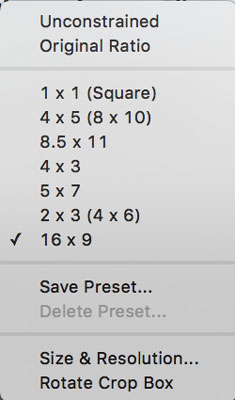 When cropping images i use the Crop tool in Adobe Photoshop albeit CS6 because I want no part of a monthly subscription. All of the screenshots you see on this blog are made with what some might consider an obsolete version of the program. I you would like to know why I’m using this software, I direct you to this post; Please read the bottom paragraph for my thoughts on this subject. Moving on…
You can use Photoshop (or your favorite image editing software) to crop a photograph to produce the exact image you had in your mind when you snapped the shutter. When you do there is a price to be paid: You’re tossing away pixels and along with that some image quality. That’s part of what’s wrong with the so-called digital zoom function many point-and-shoot cameras have. You may get a cropped image but its resolution will be lower.
A few alternative suggestions: When capturing an image using a zoom lens, why not use it to frame the image exactly the way you want to look. If you prefer prime focal length lenses, use your feet as a zoom and move around to get the subject framed exactly the way you want. Often taking a single step closer to our subject will improve the composition more than you might think. Don’t forget what the legendary Ernst Haas once said, “The most important lens you have is your legs.”

How I made this shot: I photographed this Saleen S7 at a previous SEMA show in the Las Vegas Convention Center. The camera used was an EOS 5D Mark I with EF28-135mm f/3.5-5.6 IS USM lens (at 41mm) with an exposure of 1/100 sec at f/7.1 and ISO 800. In-camera cropping, even with a zoom lens, in a trade show environment can be challenging, so later I used Photoshop’s Original Ratio cropping option to crop the image (2:3) and minimize some distractions at the edges of the frame.
When neither of these alternatives work for a given photographic situation I tend to sparingly use Photoshop’s Crop tool but these days I use it more often than in the past. When I do crop, including the below image of a Saleen S7, I used the program’s Original Ratio option keeping the image the same shape as the original, which in this case is a 3:2 file from a Canon DSLR. I used to apply the 3:2 ratio option for all of the images made my Micro Four-thirds camera because I liked the shape better that those camera’s native 4:3. But I have come to realize that was a dumb decision for all the reasons I just mentioned—tossing away image resolution. Sometimes with landscapes, cars and trains I’ll use a16:9 ratio because I love that wide-screen look. I realize I’m being logically inconsistent here, Mr. Spock would not approve.
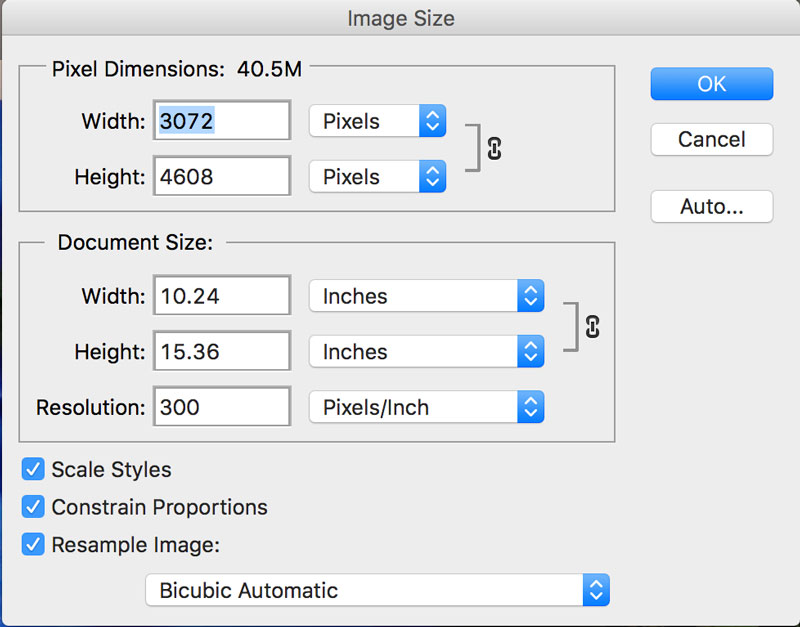 One solution? Maybe. Don’t like loosing pixels? If you want to hedge your bets, you can use Photoshop’s Image Size controls to re-size the image but be sure to check the Resample Image using the Bicubic Automatic option. A few years ago I tested a bunch of image resizing programs and found that in a blind test with me showing 13×19-inch prints to various people—photographers and everyday people—the program’s Bicubic Automatic resampling algorithms scored just as high as all of most highly rated external programs. So why not use it.
But remember there is no free digital lunch. Every pixel you crop out is lost forever. So be sure save those original files.
 If you enjoyed today’s blog post and would like to treat Joe to a cup of Earl Grey tea ($2.50), click here.
Along with photographer Barry Staver, Joe is co-author of Better Available Light Digital Photography with used copies are available from Amazon for around four bucks.