
Today’s Post by Joe Farace
Back in the day when all photographers, amateur or professional, shot with film, photo labs would often receive a roll of 36-exposure 35mm film for processing and when the prints rolled off their FujiFilm Frontier, that roll would contain images made during Christmas, Easter and Vacation. It happened so often that this parade of images eventually got a name: CEV Syndrome. Whether you shoot with film or digital, don’t let that happen to you.

How I Made this Photo: The Olympus E-P3 has ten color and monochrome Art Filters and several of which have multiple variants. You can even bracket art filters shooting all ten of them in a burst and this a great way to waste memory car space, which is what I did at the annual Father’s Day car show in Castle Rock, Colorado. The lens used to capture this street rod was the Olympus M.14-42mm f/3.5-5.6 II R kit lens with an exposure of 1/250 sec at f/10 and ISO 200.
Avoiding CEV Syndrome
How does this film-based phenomenon apply to digital photography? Memory cards may be cheap these days and fast too but they’re not perfect. Some photographers may think a card’s speed and performance are the only important aspects needed for digital capture. The brand and type of cards you use also affects workflow, such as reading and copying files with a card reader but don’t think problems can’t occur. They can. All flash memory has an inherent limited number of write/erase cycles and electrons sometime get trapped where they’re not wanted and voltage levels can shift, eventually causing failure. And sometimes cards simply wear out
In a post on my car photography blog called Avoiding Memory Card Problems, I wrote about a memory card problem that was solved by using the camera itself as a card reader by connecting it to my computer and copying the files onto my hard drive. This failure was caused by the camera, a Leica Q. Click the link above to learn more about what happened. I wrote about another memory card failure in a post for my car photography blog called Tips from the Goodguys 20th Colorado Nationals.
This kind of problems can happen more often than you might think, so here’s a few tips to avoid the kinds of problems that I encountered:
 Don’t remove a card when saving or viewing images. This seems as obvious as not sticking wet fingers in a light bulb socket but more than once I’ve had to salvage images for a neighbor who had a bad habit of doing just that—not sticking their fingers…
- Don’t remove a memory card when turning your camera on or off.
- Don’t change your memory card when the camera is on.
- From time to time, reformat the card which can prevent a card from becoming corrupted.
- Don’t purchase off-brand memory cards. Really good cards from really good companies may cost slightly more but are worth the pain and misery they avoid.
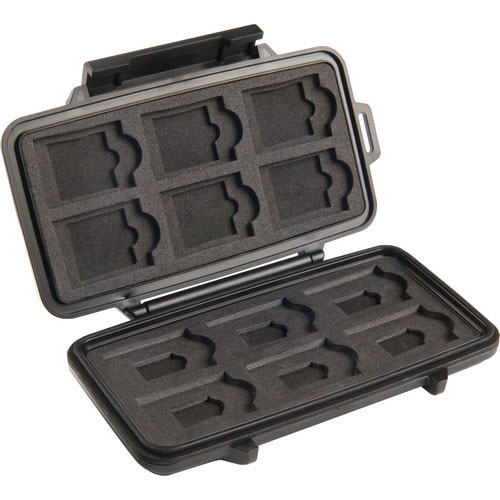
- When buying new cards, place them in a sturdy card holder. I use the indestructible Pelican Memory Card Case. It costs less than $35 and is cheap insurance against damage.
If you enjoyed today’s blog post and would like to treat me to a cup of Earl Grey tea ($3.50,) please click here. And if you do, thanks so much.